
This guide walks through creating a complete deal structure in DealStudio, from defining tranches to configuring the priority of payments waterfall.
Overview
A securitization waterfall defines how cash flows from the collateral pool to various stakeholders. In DealStudio, you'll configure:
- Collateral Deal - Either replines or a loan tape from Tape Cracker
- Tranches - Bond classes that receive interest and principal
- Fees - Servicing, trustee, and other periodic costs
- Accounts - Collection and reserve accounts
- Payment Rules - The waterfall logic governing distributions
What You'll Build
A simple 3-tranche sequential pay structure with:
- Senior (A), Mezzanine (B), and Subordinate (C) tranches
- Servicing and trustee fees
- Interest and principal collection accounts
- Sequential payment waterfall
Step 1: Define Collateral and Create a New Deal
- From the DealStudio dashboard, click New Deal to remove current configuration
- Enter deal details:
Field Example Value Deal Name EXAMPLE 2026-1First Collection Begin Date 2026-02-01First Payment Date 2026-03-25 - Choose either Replines or Tape to define the collateral.
For quick modeling, create representative lines:Repline Balance WAC WAM Count Prime $60,000,000 7.5% 60 5,000 Near-Prime $30,000,000 9.0% 48 3,000 Sub-Prime $10,000,000 12.0% 36 1,500 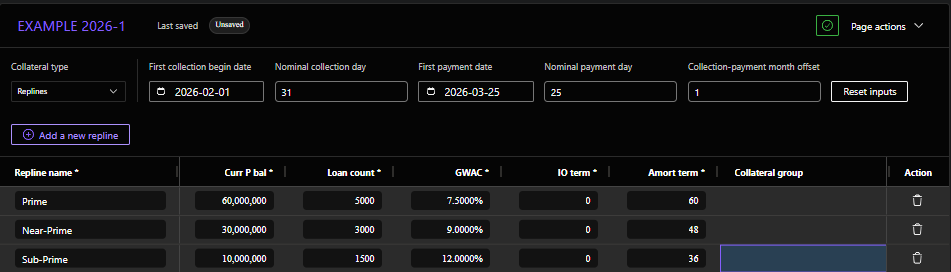 Use Tape Cracker for loan-level precision:
- Click Upload via Tape Cracker
- Select your loan file
- Map columns to standard fields
- Validate and save, copy the URL from Tape Cracker into DealStudio

Step 2: Define Your Tranches
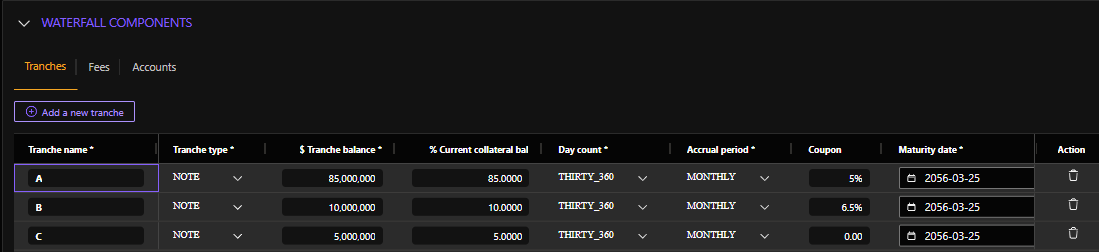
Navigate to Structure > Tranches and create each bond adding details for: name, type, balance, day count, accrual period, coupon, maturity date, coupon cap, and carryover capped interest
Tranche A (Senior)
Click Add Tranche and configure:
| Field | Value | Notes |
|---|---|---|
| Name | A | Short identifier |
| Balance | 85000000 | $85M |
| Coupon | 0.05 | 5.00% fixed |
| Accrual Period | Distribution (Actual) | Actual/360 day count |
Tranche B (Mezzanine)
| Field | Value |
|---|---|
| Name | B |
| Balance | 10000000 |
| Coupon | 0.065 |
Tranche C (Subordinate)
| Field | Value |
|---|---|
| Name | C |
| Balance | 5000000 |
| Coupon | 0.085 |
Tranche Summary
| Tranche | Balance | % of Deal | Coupon |
|---|---|---|---|
| A | $85,000,000 | 85% | 5.00% |
| B | $10,000,000 | 10% | 6.50% |
| C | $5,000,000 | 5% | 8.50% |
| Total | $100,000,000 | 100% |
Step 3: Define Fees
Navigate to Structure > Fees and add periodic costs.
Servicing Fee
| Field | Value | Notes |
|---|---|---|
| Name | Servicing | |
| Basis Type | On Starting Collateral Balance | Fee based on pool balance |
| Amount | 0.005 | 0.50% annually |
| Frequency | 12 | Paid monthly |
Trustee Fee
| Field | Value |
|---|---|
| Name | Trustee |
| Basis Type | Fixed |
| Amount | 5000 |
| Frequency | 12 |
Fee Summary
| Fee | Type | Amount | Annual Cost |
|---|---|---|---|
| Servicing | % of Balance | 0.50% | ~$500,000 initially |
| Trustee | Fixed | $5,000/mo | $60,000 |

Step 4: Configure Accounts
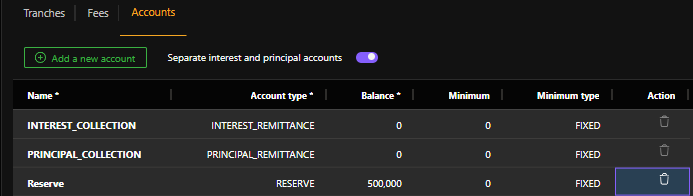
Navigate to Structure > Accounts to set up cash repositories.
Interest Collection Account
| Field | Value |
|---|---|
| Name | Interest_Collection |
| Type | Collection |
| Initial Balance | 0 |
Principal Collection Account
| Field | Value |
|---|---|
| Name | Principal_Collection |
| Type | Collection |
| Initial Balance | 0 |
Reserve Account (Optional)
| Field | Value |
|---|---|
| Name | Reserve |
| Type | Reserve |
| Initial Balance | 500000 |
Step 5: Build the Priority of Payments
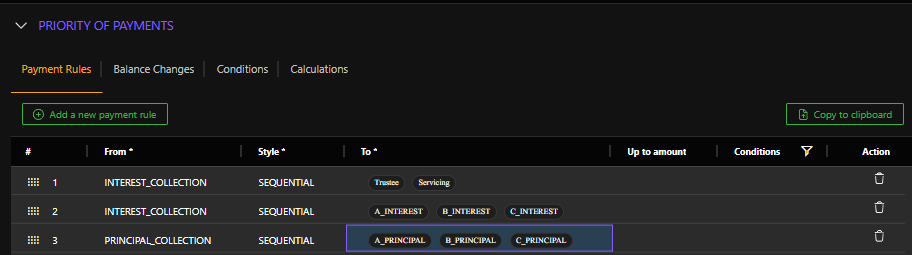
This is the heart of your waterfall. Navigate to Structure > Priority of Payments.
Understanding Payment Rules
Each rule has:
- From: Source account
- To: Destination (tranche interest, tranche principal, fee, account)
- Style: Sequential or Pro Rata
- Up To Amount: Optional cap (formula or fixed)
- Condition: Optional trigger
Sequential Pay Waterfall
For a standard sequential structure, payments flow in order: Fees → Senior Interest → Senior Principal → Mezz Interest → Mezz Principal → Sub Interest → Sub Principal.
Payment Rules
Add rules in this order:
| # | From | To | Style | Notes |
|---|---|---|---|---|
| 1 | Interest_Collection | fee[Trustee] | Sequential | Trustee paid first |
| 2 | Interest_Collection | fee[Servicing] | Sequential | Then servicing |
| 3 | Interest_Collection | tranche[A].interest | Sequential | Senior interest |
| 4 | Interest_Collection | tranche[B].interest | Sequential | Mezz interest |
| 5 | Interest_Collection | tranche[C].interest | Sequential | Sub interest |
| 6 | Principal_Collection | tranche[A].principal | Sequential | Senior principal |
| 7 | Principal_Collection | tranche[B].principal | Sequential | Mezz principal (after A paid) |
| 8 | Principal_Collection | tranche[C].principal | Sequential | Sub principal (after B paid) |
Adding Each Rule
For Rule #1 (Trustee Fee):
- Click Add Payment Rule
- Set From:
Interest_Collection - Set To:
fee[Trustee] - Set Style: Sequential
- Leave Up To Amount blank (pay full amount)
- Leave Condition blank (always applies)
Repeat for each rule in the waterfall.
Step 6: Pro Rata Alternative
For tranches that pay proportionally instead of sequentially:
Pro Rata Interest Example
| # | From | To | Style |
|---|---|---|---|
| 3 | Interest_Collection | ProRata(tranche[A].interest, tranche[B].interest) | Pro Rata |
This splits available interest between A and B based on their current balances.
Mixed Sequential/Pro Rata
Many deals have senior tranches paying pro rata, then sequential for subordinates:
1. Fees (Sequential)
2. Senior Interest - A1, A2 (Pro Rata)
3. Senior Principal - A1, A2 (Pro Rata)
4. Mezz Interest (Sequential)
5. Mezz Principal (Sequential)
6. Sub Interest (Sequential)
7. Sub Principal (Sequential)
Step 7: Add Conditions (Optional)
Conditions control when rules apply. Common examples:
Clean-Up Call
Add a condition that triggers deal redemption at 10% factor:
Condition Name: CleanupCall
Expression:
collateral[ALL].endingBalance <= 0.10 * collateral[ALL].originalBalanceThen reference in payment rules:
- Normal principal rules: Condition =
NOT CleanupCall - Redemption rule: Condition =
CleanupCall
Step-Down Trigger
Subordination can release after performance tests pass:
Condition Name: StepDown
Expression:
@CumulativeLoss / collateral[ALL].originalBalance < 0.02Step 8: Test Your Structure
Validate Configuration
DealStudio will flag errors:
- Missing tranche references in payment rules
- Circular payment logic
- Invalid formulas
Fix any red-highlighted items before proceeding.
Run a Cashflow
- Go to Cashflows tab
- Create a scenario:
- Prepay: 15% CPR
- Default: 3% CDR
- Severity: 40%
- Click Run Cashflow
Verify Results
Check that:
- Fees are paid first each period
- Interest flows to tranches in correct order
- Principal pays sequentially (A → B → C)
- Total distributions equal total collections
- Tranches amortize to zero
Complete Example: JSON Export
Here's what a complete sequential structure looks like when exported:
{
  "dealName": "EXAMPLE 2026-1",
  "settleDate": "2026-02-15",
  "tranches": [
    {"name": "A", "balance": 85000000, "coupon": 0.05},
    {"name": "B", "balance": 10000000, "coupon": 0.065},
    {"name": "C", "balance": 5000000, "coupon": 0.085}
  ],
  "fees": [
    {"name": "Trustee", "basisType": "FIXED", "amount": 5000},
    {"name": "Servicing", "basisType": "ON_STARTING_BALANCE", "amount": 0.005}
  ],
  "paymentRules": [
    {"from": "Interest_Collection", "to": "fee[Trustee]", "style": "SEQUENTIAL"},
    {"from": "Interest_Collection", "to": "fee[Servicing]", "style": "SEQUENTIAL"},
    {"from": "Interest_Collection", "to": "tranche[A].interest", "style": "SEQUENTIAL"},
    {"from": "Interest_Collection", "to": "tranche[B].interest", "style": "SEQUENTIAL"},
    {"from": "Interest_Collection", "to": "tranche[C].interest", "style": "SEQUENTIAL"},
    {"from": "Principal_Collection", "to": "tranche[A].principal", "style": "SEQUENTIAL"},
    {"from": "Principal_Collection", "to": "tranche[B].principal", "style": "SEQUENTIAL"},
    {"from": "Principal_Collection", "to": "tranche[C].principal", "style": "SEQUENTIAL"}
  ]
}
Waterfall Patterns Reference
Sequential Pay
Senior Int → Senior Prin → Mezz Int → Mezz Prin → Sub Int → Sub PrinUse for: Traditional senior/sub structures
Pro Rata Pay
All Interest (Pro Rata) → All Principal (Pro Rata)Use for: Pari passu tranches
Turbo Structure
Senior Int → Mezz Int → Sub Int → ALL Principal to Senior until paidUse for: Accelerated senior paydown
Shifting Interest
Senior Int → Sub Int → Senior Prin (locked %) → Sub Prin (locked %)Use for: RMBS with subordination floors
Troubleshooting
"Tranche not found" Error
- Check spelling and case of tranche name
- Ensure tranche is defined before payment rules reference it
Interest Shortfall
- Verify fee amounts aren't consuming all interest
- Check that coupon rates and accrual periods are correct
Principal Not Flowing
- Ensure principal collection account receives collateral payments
- Check that no conditions are blocking principal rules
Circular Reference
- Payment rules cannot create loops
- Ensure "From" and "To" don't reference each other
Last Updated: January 2026
Questions? Contact support@dv01.co