
Overview
dv01 MCP is a Model Context Protocol (MCP) server that connects AI models to dv01's tools and data, so that licensed clients can run queries and jobs through their preferred AI instance. It unifies Collateral Analysis and Cashflows behind a single MCP endpoint and client connection.
With dv01 MCP, licensed clients can query collateral and loan performance data and run cashflow and waterfall projections directly through AI models using natural language — without a dv01 web application session.
From a client perspective, dv01 MCP is a single platform with one access point and a unified experience. The underlying tools are surfaced based on your organization's licensing, not as separate products or onboarding flows.
Who it's for
dv01 MCP is built for new and existing dv01 web app and Cashflows API users, including buy-side and structuring analysts focused on portfolio/collateral surveillance and performance analysis, and structuring and surveillance teams doing deal-level cashflow and waterfall modeling.
What it does
The platform delivers MCP capabilities through a shared infrastructure layer, accessible via a single MCP endpoint. It brings together two core capability areas:
- Collateral Analysis — Query collateral and loan performance data through AI assistants without a dv01 login or web application session. Supports stratifications, time-series performance analysis, cure rates, CPR, and CDR, accessed through natural-language requests rather than manual dashboard navigation.
- Cashflows — Run cashflow and waterfall projections through the same conversational interface. Wraps dv01's existing Cashflows API, allowing agents to submit deals or scenarios (including overrides and pricing) and return structured results without custom integrations or manual workflows.
Both capabilities are surfaced based on your organization's licensing.
Why use it
- Reduces time to access data and analysis tools — unlock loan/collateral performance analysis and cashflows by querying from an AI model, without engaging with the web app.
- Enables you to build AI workflows and capabilities that embed dv01 data.
- Eliminates the dv01 web-app learning curve for new users.
- Saves the time of building your own custom integration to access dv01 capabilities.
How to access dv01 MCP
You can connect to the dv01 MCP server via a connector in whichever AI model instance you prefer — the terminal (CLI), the browser application, or the desktop application.
Production endpoint:
https://mcp.dv01app.com/mcpVia an application
For Claude (Anthropic): Claude's browser and desktop apps share the same account and sync the same connector list, so a connector added in one appears in the other.
- Via custom connectors: profile menu → Settings → Connectors → find dv01 MCP and connect.
- Via Marketplace: profile menu → Settings → Plugins → find dv01 MCP.
For ChatGPT (OpenAI): Custom config connections are only available on desktop; on the browser, the dv01 MCP connector is found via the marketplace.
- On the desktop (via custom connector): profile menu → Settings → Plugins → MCPs → find dv01 MCP.
Via the terminal (CLI)
For Claude (Anthropic):
claude mcp add --transport http dv01-mcp https://mcp.dv01app.com/mcpFor Codex (OpenAI):
codex mcp add dv01-mcp --url https://mcp.dv01app.com/mcpVia an application
For Claude (Anthropic): Claude's browser and desktop apps share the same account and sync the same connector list, so a connector added in one appears in the other.
- Via custom connectors: profile menu → Settings → Connectors → find dv01 MCP and connect.
- Via Marketplace: profile menu → Settings → Plugins → find dv01 MCP.
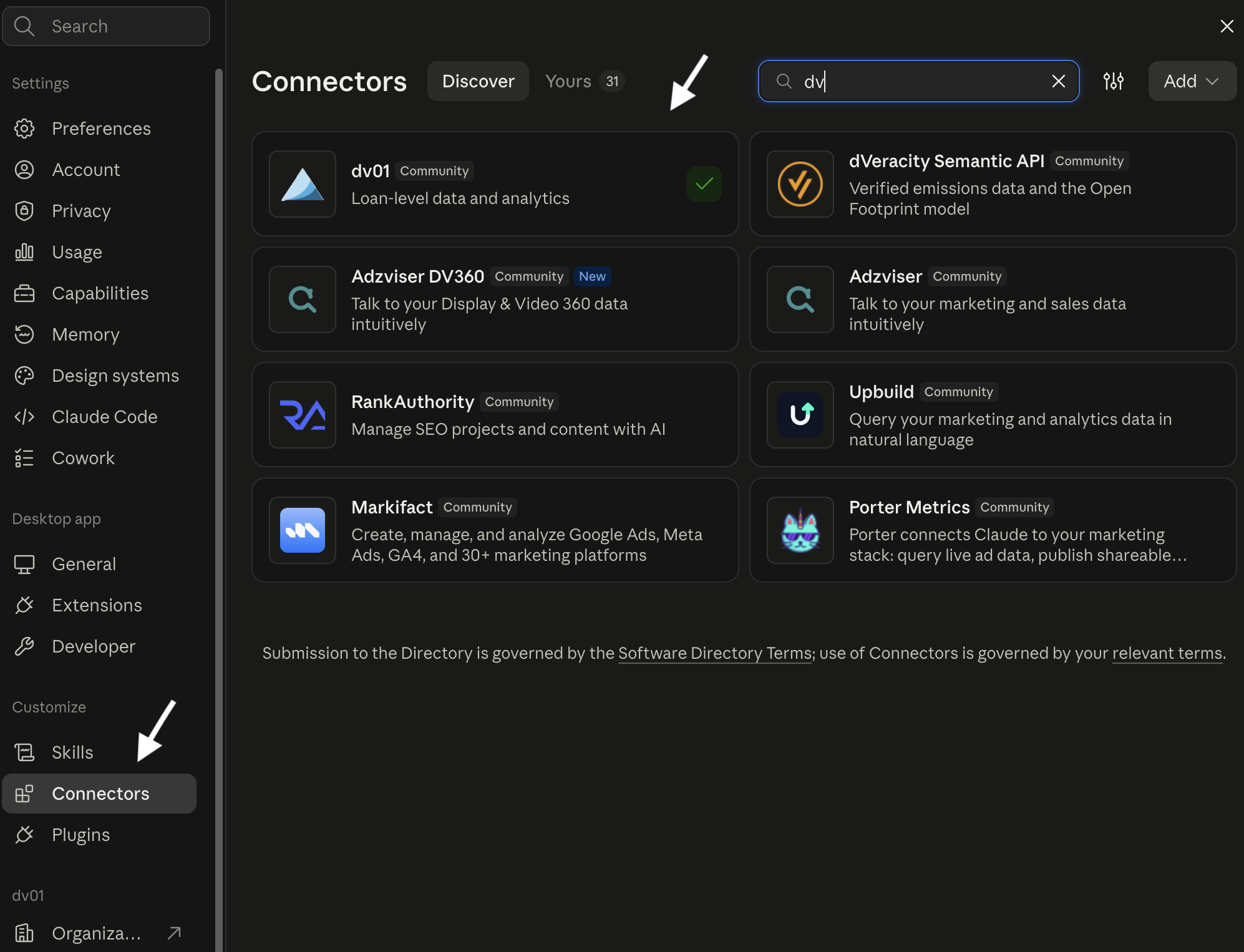
For ChatGPT (OpenAI): Custom config connections are only available on desktop; on the browser, the dv01 MCP connector is found via the marketplace.
- On the desktop (via custom connector): profile menu → Settings → Plugins → MCPs → find dv01 MCP.
Feature 1: Collateral Analysis
Query and analyze loan-level and portfolio-level data using natural-language requests. Ask questions about collateral characteristics, performance, delinquencies, losses, prepayments, and other loan metrics without navigating the dv01 web application or manually constructing queries.
You can:
- Explore and stratify data — Query available datasets, deals, portfolios, and loan-level data; segment by attributes such as FICO, vintage, state, loan grade, or asset class.
- Analyze performance — Analyze delinquency, losses, prepayments, impairments, and other metrics across time, vintages, and loan age (MOB), including time-series and pivot-table views.
- Investigate loans — Identify loans meeting specific criteria and investigate changes in status, balances, payments, or performance.
- Understand data and metrics — Ask about available fields, tables, and dv01 methodologies, including CPR, CDR, cumulative loss, and MOB.
Example prompts:
- "What percentage of active loans in the Auto Benchmark transitioned to 30+ days past due each month since January 2023?"
- "Show cumulative gross loss by loan age and quarterly vintage for the Consumer Unsecured Benchmark."
- "Show CPR for 2019–2024 vintages by MOB in a pivot table."
- "What is the 30+ DQ cure rate for Subprime Auto by as-of date?"
- "What is the average interest rate by state for the Consumer Unsecured Benchmark?"
- "What datasets do I have access to?"
Feature 2: Cashflows
Run cashflow and waterfall projections through the same conversational interface. Submit deals or scenarios, specify assumptions and overrides, and receive structured modeling results without building a custom integration or manually running the Cashflows API.
You can:
- Run cashflow projections — Submit deals or pools and generate projected cashflows using specified assumptions.
- Model scenarios — Apply supported overrides and assumptions, such as prepayments, defaults, rates, and pricing.
- Analyze waterfall results — Evaluate projected cashflows and tranche-level outcomes under different scenarios.
Example prompts:
- "Run a cashflow projection on this pool assuming 10% prepayments and 2% defaults."
- "What happens to the mezzanine tranche if rates rise another 100 basis points?"
- "Model this deal using the [structure/template] template."
- "Price this deal at par and show me the resulting yield."
Feedback and support
Questions, feedback, or issues with dv01 MCP can be shared with your dv01 representative. For contact information, see your account team or reach out through the dv01 support portal.