
What's New
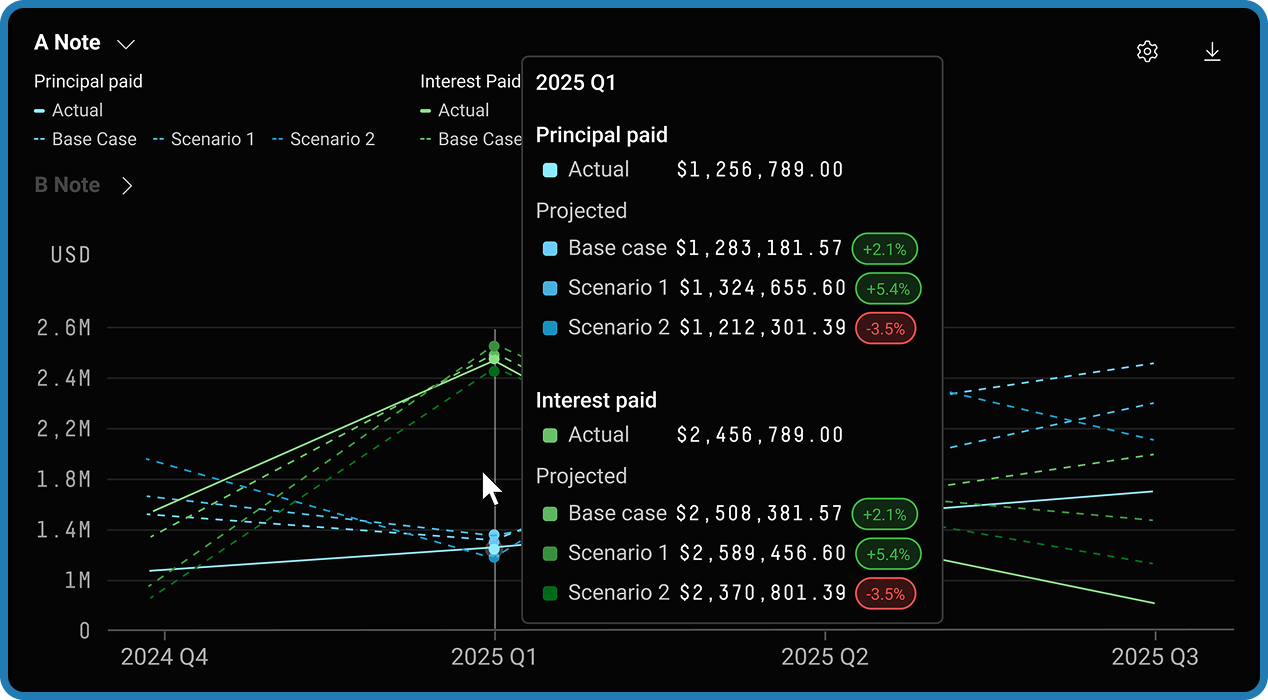
dv01 now enables users to load previously saved cashflow projections and compare them directly against realized performance — all within a new Cashflow Performance section under Performance. This feature is available for both Securitizations and Portfolio Surveillance workflows.
Note: This feature requires a previously generated projection and at least one month of performance data for your dataset.
Feature Highlights
- Side-by-side comparison — View projected and actual cashflows together in an interactive chart and detailed table, with support for collateral-level and tranche-level analysis. Actual data is displayed as solid lines; projected data as dashed lines.
- Flexible metrics and timeframes — Display key cashflow metrics on a monthly or quarterly basis. Collateral-level comparisons include Principal, Interest, Scheduled Principal, Recovery, Net Loss, and Ending Balance. Deal-level comparisons add tranche-specific metrics like Writedown Amount and Shortfall Amount.
- Multiple scenario support — Overlay multiple projection scenarios against actuals to evaluate how different assumption sets performed.
- Deviation tracking — Colored percentage badges in the comparison table instantly highlight where projections diverged from actuals — green when projected met or exceeded actual, red when it fell short.
- Filter continuity — Filters from the original projection are automatically re-applied, ensuring an apples-to-apples comparison.
- Chart interactivity — Zoom, scroll, pan, and navigate across time periods using the built-in timeline controls. Customize the display with chart settings for markers, gridlines, data labels, and line smoothing.
- Export everything — Export the chart as PNG or PDF, and the table as CSV or Excel for offline analysis and reporting.
- Browse All Projections — A searchable modal lets you browse all saved projections across datasets, with details like scenario set, cashflow type, settlement date, and who created it.
How It Works
Create and save a cashflow projection on the Cashflows page by configuring your scenario assumptions (CPR, CDR, recovery vectors, purchase rate vectors, etc.) and selecting Cashflow Actions > Save > Scenario Set and Projection. Then navigate to Performance > Cashflow Performance and select your projection from the dropdown. Use the Edit Chart panel to choose which tranches, scenarios, and metrics to display, then click Apply Changes.
Actual performance data is aggregated monthly — at least one remittance date must pass before realized data is available. To do a backward-looking comparison on a pool that already has history, back-date the projection by choosing a prior settlement date.
Who This Is For
Cashflows users across Securitizations and Portfolio Surveillance.
Why It Matters
As transaction structures become more complex, understanding whether your cashflow assumptions align with real-world outcomes is critical. This feature streamlines performance reporting, surfaces gaps between projections and actuals, and reduces reliance on manual reconciliation across spreadsheets and offline models.
For a more detailed walkthrough including step-by-step instructions and FAQs, visit our full Projected vs. Realized Cashflows documentation.